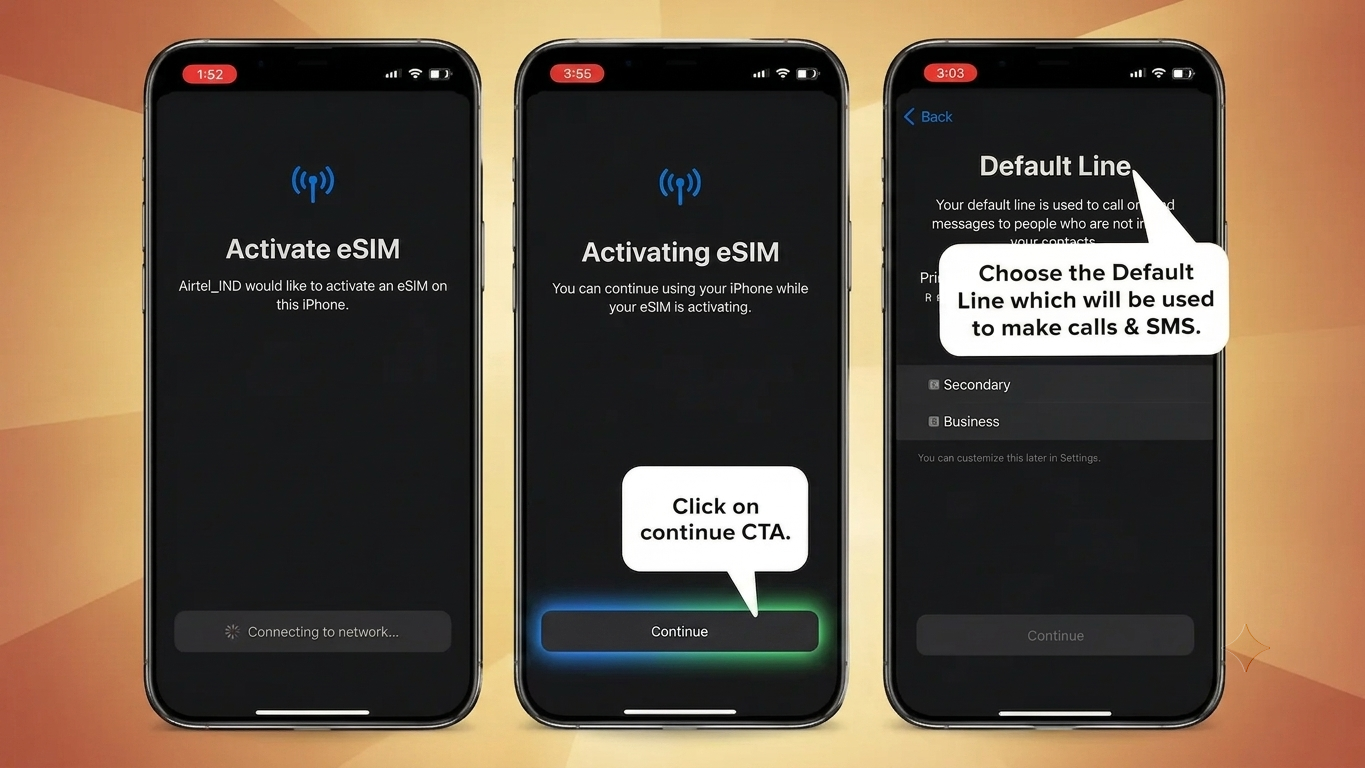
Switching from a physical SIM to an eSIM can make your smartphone setup simpler and more convenient. Airtel supports eSIM services on a range of compatible smartphones in India, allowing users to move their existing mobile connection to a digital SIM without using a physical SIM card.
If your phone supports eSIM and you want to convert your Airtel number, you can generally complete the request through the Airtel Thanks app. Below is a simple guide explaining what you need to know before starting and how the activation process works.
Also Read: Best Reward Apps for Free Mobile Recharge in 2026
What Is an Airtel eSIM?
An eSIM, or embedded SIM, is a digital version of a traditional SIM card. Instead of inserting a physical card into your phone, the SIM profile is downloaded and stored electronically on the device.
After successful activation, an eSIM can provide the same basic mobile services as a regular SIM, including calls, SMS and mobile data.
The exact eSIM features available to you depend on your smartphone model, software version and Airtel service.
What You Should Check Before Activating eSIM
Before beginning the conversion, make sure:
- Your smartphone supports eSIM.
- Your Airtel number is active and accessible for OTP verification.
- Your phone is connected to the internet, preferably through Wi-Fi.
- You have access to the email address or contact details required during the activation process, if requested.
- You can find your device’s EID number.
It is also a good idea to keep your phone charged before starting the process.
What Does EID Mean?
EID stands for Embedded Identity Document. It is a unique identification number associated with the eSIM hardware in a compatible device.
Airtel may ask for your phone’s EID while processing an eSIM request. Depending on your smartphone, you can usually find it under the SIM, mobile network, About Phone, or device information settings.
Because the EID is part of the eSIM activation process, avoid sharing it publicly or with unknown people.
How to Convert Your Airtel SIM to eSIM
If you’re using a compatible device, you can follow these general steps:
1. Open the Airtel Thanks App
Install the latest version of the Airtel Thanks app and sign in with your Airtel mobile number.
2. Find the eSIM Upgrade Option
From the app’s home screen, look for the available shortcuts or mobile-service options. Select the option related to upgrading or converting to eSIM.
The wording and location of this option may change when Airtel updates its app.
3. Select Your Device
Airtel may ask where you want to activate the eSIM.
Choose This Device if you are converting the SIM on the same smartphone. If you are transferring the connection to another compatible device, select the relevant option for another device.
4. Enter Your EID
Enter the EID displayed by your smartphone when Airtel asks for it.
Double-check the number before submitting the request because an incorrect EID can interfere with the activation process.
5. Complete OTP Verification
Airtel will send an OTP to your registered Airtel number as part of the verification process.
Enter the OTP only inside the official Airtel activation flow. Never share an OTP with another person.
6. Complete Airtel’s Verification
Depending on Airtel’s current activation procedure, you may receive a verification call or another confirmation request.
Follow the instructions provided by Airtel and confirm the eSIM request only if you initiated it yourself.
7. Download the eSIM Profile
After the request is approved, Airtel will make the eSIM profile available for installation.
Follow the instructions displayed on your smartphone to download and install the profile. Keep your device connected to the internet during this stage.
8. Enable the New eSIM
Once installation is complete, open your phone’s SIM or mobile-network settings and make sure the newly installed Airtel eSIM is enabled.
If you are replacing your physical Airtel SIM, follow Airtel’s instructions regarding when to remove the old SIM. Restarting the phone can also help the device reconnect to the Airtel network.
How Long Does Airtel eSIM Activation Take?
The activation time can vary depending on the verification and Airtel’s current process. Do not assume that the eSIM will become active immediately after submitting the request.
If the eSIM has not started working after the expected processing period, check your phone’s network settings and contact Airtel through its official support channels.
What Happens to the Physical SIM After Conversion?
When an existing Airtel physical SIM is converted to an eSIM, the physical SIM generally stops being the active SIM for that mobile connection once the eSIM is successfully activated.
Therefore, do not throw away your physical SIM before the eSIM is working properly. Wait until the conversion has completed and your Airtel services are functioning normally.
Important Safety Tips for Airtel eSIM Activation
Keep these points in mind when converting your SIM:
- Never give your OTP to anyone over a phone call, message or social media.
- Do not share your EID unnecessarily.
- Start the process through Airtel’s official app or customer-support channels.
- Do not approve an eSIM request that you did not initiate.
- If your phone is lost or stolen, contact Airtel as soon as possible.
- Keep your device connected to a reliable internet connection while downloading the eSIM profile.
What If Airtel eSIM Is Not Working?
If the eSIM has been installed but your phone isn’t connecting to the network, try these basic checks:
- Make sure the Airtel eSIM is enabled in SIM settings.
- Restart your smartphone.
- Check whether mobile network settings are configured correctly.
- Make sure Airplane Mode is turned off.
- Check whether your phone is showing an Airtel network signal.
- If the problem continues, contact Airtel customer support or visit an Airtel Store.
The exact troubleshooting steps can differ between Android and iPhone models.
Also Read: How to Recharge a Mobile Number Online: Easy Step-by-Step Guide
Final Thoughts
Activating an Airtel eSIM is a convenient alternative to using a traditional physical SIM, provided your smartphone supports the technology. The process involves verifying your Airtel number, providing the device’s EID and installing the eSIM profile after Airtel completes its verification.
Before starting, make sure you have a compatible phone, a stable internet connection and access to your Airtel number for verification. Most importantly, use only Airtel’s official activation process and never share OTPs or other verification details with strangers.

Sourav Gorai, founder of sabhigyan.com, is passionate about technology, smartphones, apps, and digital tools. With 8+ years of experience in the digital and tech space, he focuses on creating easy-to-understand, practical, and helpful content that makes everyday technology simpler for readers.
1 thought on “How to Activate Airtel eSIM in 2026: Easy Step-by-Step Process”