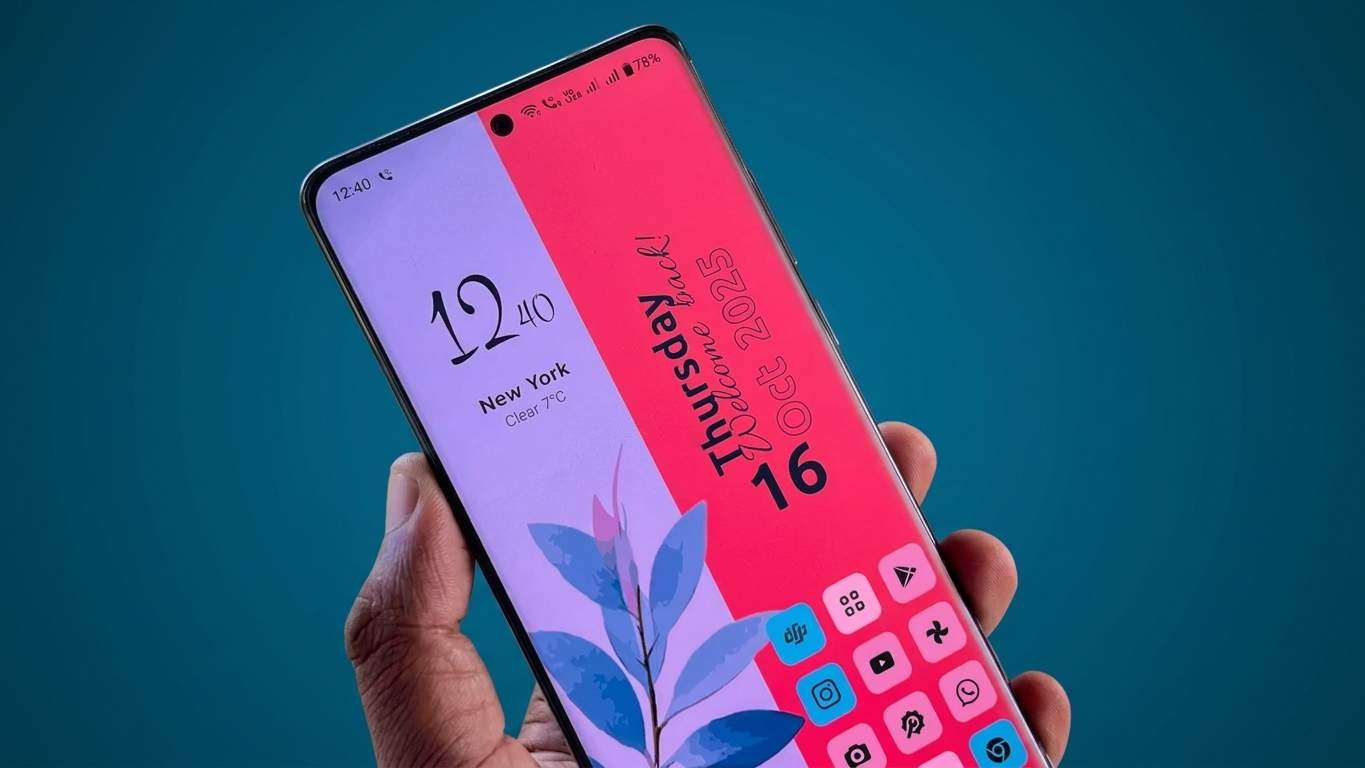
Your Android phone’s interface is something you see every time you unlock the device. While the default launcher works well for most people, a cleaner layout, better customization options, and a fresh visual style can make everyday use feel much more enjoyable.
53 Themes, Zero Clutter – Modern Launcher is designed around this idea. It combines a minimalist home-screen experience with multiple themes and customization features, giving users more control over how their Android interface looks and feels.
Also Read: Wallcraft: Give Your Phone a Fresh Look with 4K and Live Wallpapers
A Large Collection of Themes to Explore
One of the most noticeable features of this launcher is its collection of 53 themes. Instead of keeping the same appearance for months, users can switch between different visual styles whenever they want.
The themes can vary in areas such as:
- Colors and wallpapers
- Icon appearance
- Home-screen layouts
- Overall visual style
- Different moods and aesthetics
For example, you might prefer a simple design while working and switch to something more colorful when you want a different look. The variety makes it easier to find a style that matches your personal preference.
A Cleaner Home Screen Without Unnecessary Elements
The launcher focuses heavily on a clutter-free interface. Rather than filling the home screen with numerous shortcuts and widgets, you can keep only the items you actually use.
Apps can also be arranged into folders or organized in a way that makes sense for your daily routine. A simpler layout can make it easier to find frequently used applications without constantly searching through a crowded home screen.
The result is a more straightforward Android experience where the interface stays focused on the things that matter to you.
Search and Gestures Make Navigation Easier
Customization isn’t limited to wallpapers and icons. The launcher also provides features intended to make navigation more convenient.
A search function can help you quickly locate apps and other available items instead of manually browsing through multiple screens.
Depending on the launcher version and supported device features, gesture controls can also provide shortcuts for common actions. Users may be able to configure gestures for tasks such as opening an application or accessing specific functions.
This can be particularly useful if you prefer navigating your phone with gestures rather than relying entirely on traditional buttons and icons.
Designed With a Lightweight Approach
Another reason users may consider a minimalist launcher is its focus on keeping the interface simple.
A launcher that avoids unnecessary visual elements can feel less overwhelming, particularly on devices with modest hardware. However, actual battery consumption, RAM usage, and overall performance can vary depending on the Android version, phone model, installed apps, and the launcher’s current version.
So, rather than assuming that any lightweight launcher will automatically make an older phone faster, it’s better to judge its performance on your own device.
Customize the Interface Your Way
Android is popular partly because it gives users considerable freedom to personalize their phones. This launcher follows the same approach by offering different customization options.
Depending on the available features, you can adjust elements such as:
- App icons
- Home-screen grid
- Transparency
- Animation effects
- Wallpapers
- Overall appearance
These options allow you to create a home screen that feels more personal instead of simply using the manufacturer’s default layout.
Why Try a Minimal Android Launcher?
There are several reasons someone might want to experiment with a launcher like this:
1. Lots of visual choices
The 53-theme collection gives you multiple designs to try.
2. Cleaner interface
A less crowded home screen can make everyday navigation more comfortable.
3. Convenient search
Finding frequently used apps can be quicker with an integrated search feature.
4. Gesture-based navigation
Custom gestures can provide shortcuts for actions you perform regularly.
5. Personalization options
Icons, layouts, animations, and other interface elements can be adjusted to suit your preferences.
Is It Worth Trying?
If you are tired of the standard Android home screen and want something more minimal and customizable, 53 Themes, Zero Clutter – Modern Launcher is an option worth exploring.
Its main appeal is the combination of a clean interface, multiple themes, gesture-based navigation, and customization tools. However, features and performance can differ between devices and app versions, so check the launcher’s current feature list and permissions before installing it.
A launcher can change the appearance and navigation of your phone, but it won’t magically upgrade the underlying hardware. The best choice ultimately depends on how well its design and features match your personal preferences.
Official Play Store Link
Also Read: How to Access and Edit Google Drive Files Without Internet
Final Thoughts
A good Android launcher should make your phone easier and more enjoyable to use rather than simply adding more things to the screen. With its emphasis on minimalism and theme-based customization, 53 Themes, Zero Clutter – Modern Launcher takes a straightforward approach to Android personalization.
If you enjoy regularly changing your phone’s appearance while keeping the home screen organized, this type of launcher could be an interesting alternative to the default Android interface.

Sourav Gorai, founder of sabhigyan.com, is passionate about technology, smartphones, apps, and digital tools. With 8+ years of experience in the digital and tech space, he focuses on creating easy-to-understand, practical, and helpful content that makes everyday technology simpler for readers.
Advertisements