As more apps are installed on an Android phone, the home screen can quickly become crowded with icons, folders, and widgets. This clutter often makes it harder to find frequently used apps and can affect the overall user experience.
If you prefer a simple, organized interface, Niagara Launcher offers a minimalist alternative to traditional Android launchers. It focuses on speed, easy navigation, and a distraction-free layout while keeping essential apps within easy reach.
Also Read: Comfer Launcher Delivers a Fast, Clean, and Privacy-Focused Android Experience
What Is Niagara Launcher?
Niagara Launcher is a lightweight Android launcher that replaces the default home screen with a clean and streamlined design. Instead of displaying multiple pages filled with apps, it presents a carefully organized layout that emphasizes simplicity and quick access.
The launcher is designed for users who want a more focused smartphone experience without unnecessary visual clutter.
Why Choose Niagara Launcher?
Unlike many feature-packed launchers, Niagara Launcher prioritizes ease of use over excessive customization. Its minimalist approach helps users navigate their phones more efficiently while maintaining a modern appearance.
Some of the reasons Android users choose Niagara Launcher include:
- Simple and organized home screen
- Fast access to important apps
- Smooth navigation
- Minimal visual distractions
- Lightweight performance
Key Features of Niagara Launcher
Minimalist Home Screen
The launcher keeps the interface clean by displaying only the apps you use most often. This makes the home screen feel less crowded and easier to manage.
Quick App Access
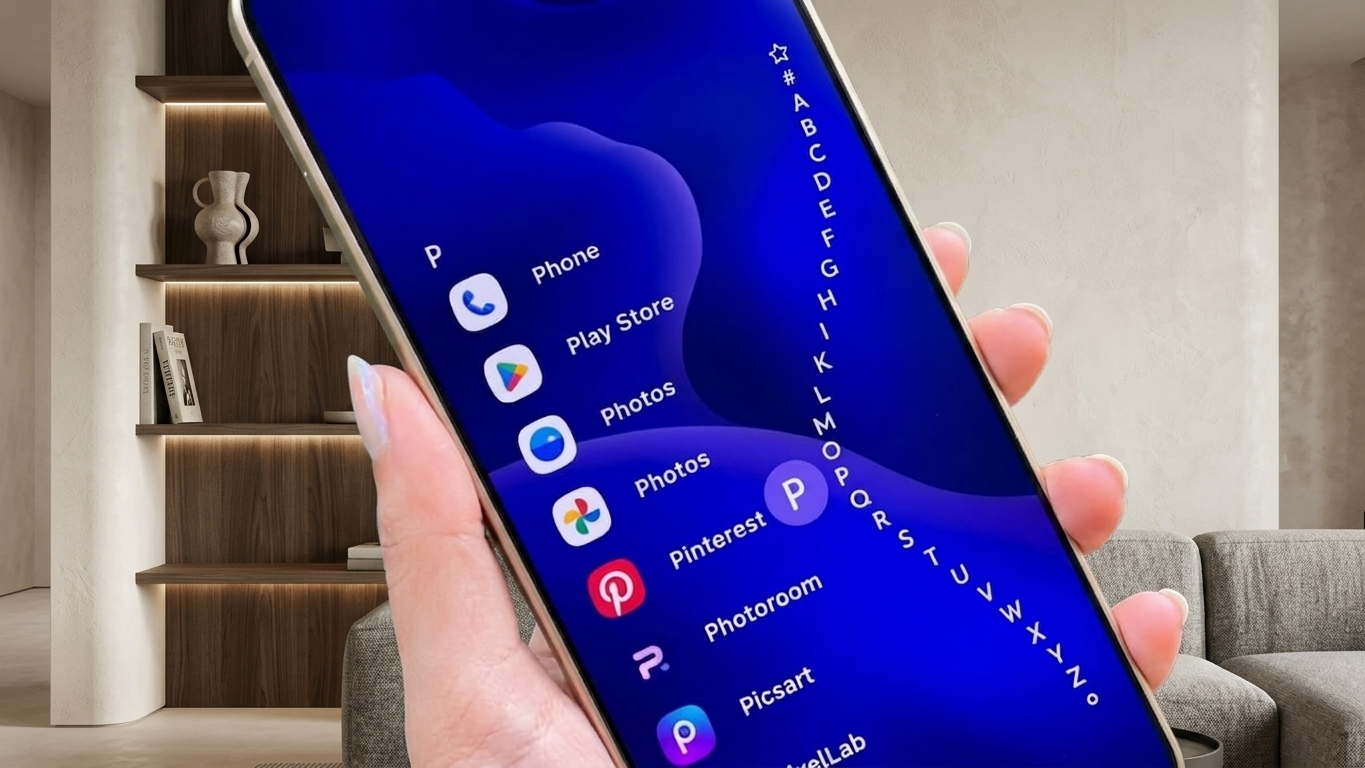
One of Niagara Launcher’s standout features is its alphabetical navigation system. By sliding along the edge of the screen, users can quickly jump to apps based on their first letter, making large app collections easier to browse.
Smart Notification Integration
Instead of constantly opening the notification panel, Niagara Launcher allows compatible notifications to appear in a convenient way on the home screen, helping users stay informed while reducing unnecessary interruptions.
Personalization Options
Although simplicity is its main focus, Niagara Launcher still offers several customization features, including:
- Themes
- Icon packs
- Fonts
- Home screen appearance
- Selected widgets such as clocks and weather
These options allow users to personalize the interface without sacrificing its clean design.
Lightweight Performance
Niagara Launcher is designed to use system resources efficiently. Its lightweight nature helps many Android devices remain responsive, including some older smartphones.
Actual performance depends on your device specifications and Android version.
Benefits of Using Niagara Launcher
Many Android users appreciate Niagara Launcher because it combines simplicity with practical everyday features.
Some of its advantages include:
- Faster access to apps
- Organized home screen
- Modern minimalist design
- Easy one-handed navigation
- Reduced visual clutter
- Smooth everyday performance
These features make it especially appealing to users who prefer a clean smartphone interface.
Who Might Like Niagara Launcher?
Niagara Launcher is suitable for a wide range of Android users, including:
- Students
- Office professionals
- Android customization enthusiasts
- Minimalist users
- People with older Android devices
- Users looking for a distraction-free experience
Anyone who values simplicity over complex layouts may enjoy using this launcher.
Things to Consider Before Installing
Before switching to Niagara Launcher, keep a few points in mind:
- Some advanced customization features available in other launchers may be limited.
- Available features can vary depending on the app version.
- Compatibility depends on your Android device and operating system.
- Reviewing user feedback before installation is always recommended.
How to Install Niagara Launcher
Getting started is simple:
- Open the Google Play Store.
- Search for Niagara Launcher.
- Install the app from a trusted publisher.
- Launch the application.
- Set it as your default launcher if you prefer its interface.
After setup, you can customize the launcher according to your preferences.

Also Read: Computer Launcher for Android Gives Your Phone a Desktop-Like Look and Feel
Final Thoughts
Niagara Launcher offers a refreshing alternative to traditional Android home screens by focusing on speed, organization, and simplicity. Its clean layout, fast app navigation, smart notification handling, and lightweight performance make it a strong option for users who want a clutter-free Android experience.
If you’re looking to simplify your smartphone without sacrificing usability, Niagara Launcher is definitely worth exploring.

Ankita Kumar, founder of sabhigyan.com, is passionate about technology, smartphones, apps, and digital tools. With 8+ years of experience in the digital and tech space, he focuses on creating easy-to-understand, practical, and helpful content that makes everyday technology simpler for readers.
Advertisements