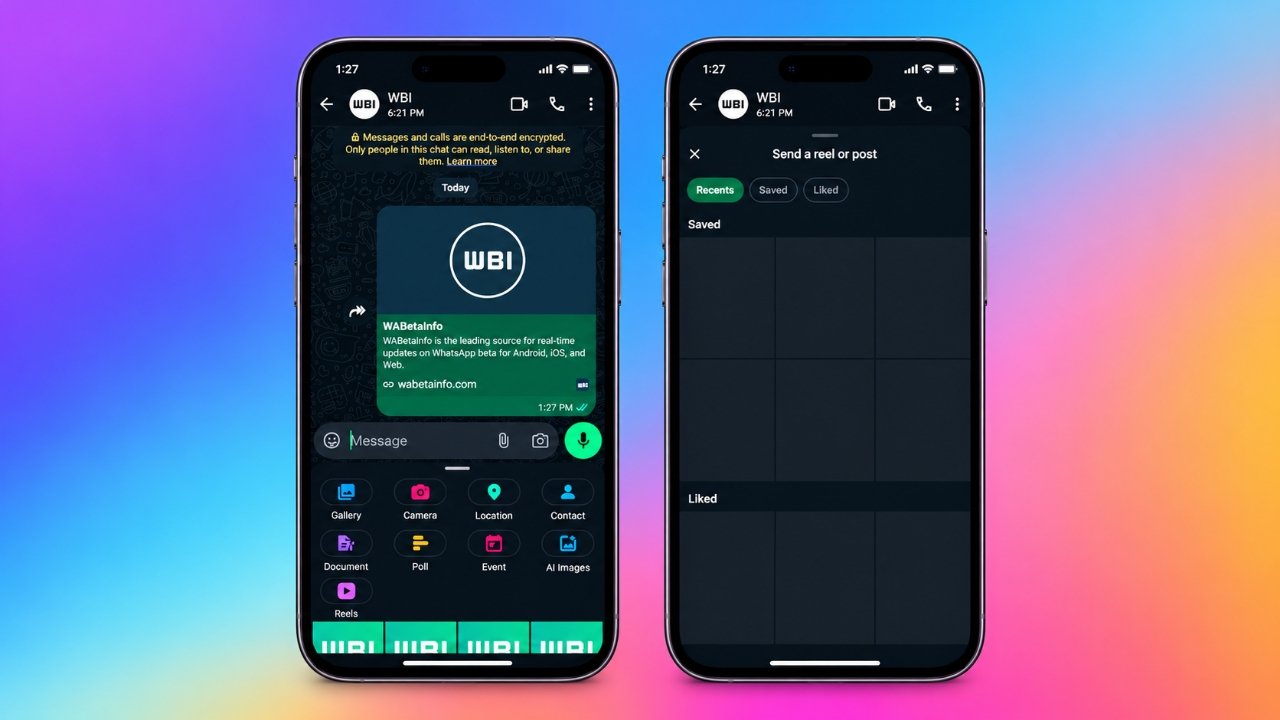
WhatsApp is testing two new features that could make messaging more convenient for Android users. The latest beta versions introduce a dedicated shortcut for sharing Instagram Reels and a scheduled messaging option that allows users to prepare messages in advance and choose when they should be sent.
Both features are currently available to a limited number of beta testers. While the Reels shortcut aims to simplify sharing Instagram content, scheduled messages could help users plan birthday wishes, reminders, and other messages without having to send them manually at the right moment.
There is no confirmed date for the public rollout of either feature.
Also Read: WhatsApp Introduces 2x Video Playback Speed for Status Updates on Android
What’s New in WhatsApp Android Beta?
According to reports from WABetaInfo, the Reels-sharing shortcut was spotted in WhatsApp Android beta version 2.26.42.9 on October 23, 2026. Scheduled messages were reported earlier in Android beta version 2.26.40.7.
Here is a quick overview of the latest developments:
- Instagram Reels shortcut: Access recently watched, saved, and liked Reels directly from a chat’s attachment menu.
- Scheduled messages: Write a message and select a future date and time for delivery.
- Individual and group chats: Schedule messages for personal conversations as well as group discussions.
- Limited availability: Both features are still being tested and may not appear on every beta account.
Share Instagram Reels Directly From WhatsApp Chats
The new Reels shortcut is designed to make sharing Instagram content easier. Instead of navigating through multiple menus to find a video or post, users may be able to access Instagram content directly from WhatsApp’s chat attachment menu.
Previously, sharing Instagram content could involve opening the media picker, selecting the Instagram source, and searching for the desired item. The new shortcut introduces a dedicated screen intended to simplify this process.
Three ways to find Instagram content
The reported sharing interface includes three sections:
- Recents: Find Instagram Reels you have watched recently.
- Saved: Browse Reels and posts you have bookmarked on Instagram.
- Liked: Access content you have liked on the platform.
After finding the content you want to share, you can select it and send it directly to a WhatsApp conversation.
This feature builds on Meta’s efforts to improve access to Instagram and Facebook content within WhatsApp. However, there is one important requirement: your WhatsApp account must be linked to Meta’s Accounts Center.
Connecting accounts remains optional. Users who prefer to keep their accounts separate may not see the new Reels shortcut, even if they are using a compatible beta version.
WhatsApp Scheduled Messages: How the Feature Works
Another feature under development could help users manage their conversations more efficiently. Scheduled messaging allows users to compose a message, select a future delivery time, and save it for automatic sending.
According to WABetaInfo, the feature was spotted in WhatsApp Android beta version 2.26.40.7 in October 2026. A similar option has also been reported in an iOS beta build distributed through Apple’s TestFlight platform.
The feature is being tested for both individual and group conversations. Supported content reportedly includes text, links, photos, and videos, subject to certain restrictions.
Steps to schedule a WhatsApp message
If the feature is available on your account, you can follow these steps:
- Open the individual or group chat where you want to send the message.
- Type your message in the chat box.
- Touch and hold the Send button to access the scheduling option.
- Choose your preferred delivery date and time.
- Confirm your selection to schedule the message.
To schedule a photo or video, select the media from the gallery picker before opening the scheduling option. The current beta reportedly supports only one photo or one video per scheduled message.
These instructions describe the reported beta interface. Users who have not received the feature will not see the scheduling option, and the steps may change before the public release.
Scheduled Messages: Current Limits and Restrictions
The feature has several reported limitations that users should understand before relying on it.
| Feature | Current beta details |
|---|---|
| Earliest delivery | 10 minutes after scheduling |
| Maximum scheduling period | Up to two weeks in advance |
| Supported content | Text, links, one photo, or one video |
| Available chats | Individual and group conversations |
| Phone connectivity | Messages are reported to send at the scheduled time even if the phone is offline |
| Manage scheduled messages | Through the chat information screen |
Group conversations have an additional consideration. According to the reported behaviour, only people who belong to the group when a message is scheduled will receive it.
Recipients are not informed that a message was scheduled. Similarly, if the sender deletes a scheduled message before it is delivered, recipients do not receive a notification about the deletion.
The feature is also intended to support delivery to people who have not yet received scheduled messaging on their own WhatsApp accounts. However, these details are based on beta testing and may change before the final release.
When Will These WhatsApp Features Be Available to Everyone?
WhatsApp has not announced an official public release date for either the Reels shortcut or scheduled messages.
The company generally tests new features with selected beta users before considering a wider rollout. During testing, functionality and interface elements may be adjusted based on development requirements and user feedback.
Reports indicate that access to these features is expanding gradually. However, installing the newest beta version does not guarantee access because availability can vary between accounts.
For now, both additions should be considered experimental features rather than tools available to every WhatsApp user. Anyone waiting to try them may need to wait for further testing or an official announcement.
Frequently Asked Questions
1. Can I schedule WhatsApp messages on Android?
WhatsApp is testing scheduled messaging with selected Android beta users. If your account has access, you can choose a future delivery time through the scheduling option associated with the Send button.
2. How far in advance can I schedule a WhatsApp message?
The current beta reportedly allows users to schedule messages from 10 minutes to two weeks ahead. These limits could change before the feature becomes publicly available.
3. Why can’t I see the Instagram Reels button in WhatsApp?
The shortcut is still being tested with selected users. It also reportedly requires your WhatsApp account to be linked to Meta’s Accounts Center. Even users with a compatible beta version may not have access yet.
4. Does scheduled messaging work in WhatsApp groups?
Yes. Group conversations are included in the reported beta functionality. However, delivery may depend on group membership when the message is scheduled.
5. Can I schedule WhatsApp messages containing photos and videos?
The current beta reportedly supports text, links, one photo, or one video in a scheduled message. Support for multiple photos or videos in a single scheduled message has not been confirmed.
6. Will a scheduled message send if my phone is offline?
Beta reports indicate that scheduled messages can be delivered at the selected time even when the phone is offline. Users should verify the behaviour after the feature reaches the stable version before relying on it for important communications.
Also Read: WhatsApp Starts Rolling Out Parental Controls for Teen Accounts
Final Thoughts
WhatsApp’s Reels shortcut and scheduled messaging feature could improve two common messaging activities. The Reels shortcut may reduce the steps needed to share Instagram content, while scheduled messages could help users prepare birthday wishes, reminders, and other communications ahead of time.
However, both features remain in development, and their final functionality has not been confirmed for a public release. Until WhatsApp announces wider availability, most users will need to wait before accessing these options.

Ankita Kumar, founder of sabhigyan.com, is passionate about technology, smartphones, apps, and digital tools. With 8+ years of experience in the digital and tech space, he focuses on creating easy-to-understand, practical, and helpful content that makes everyday technology simpler for readers.
Advertisements