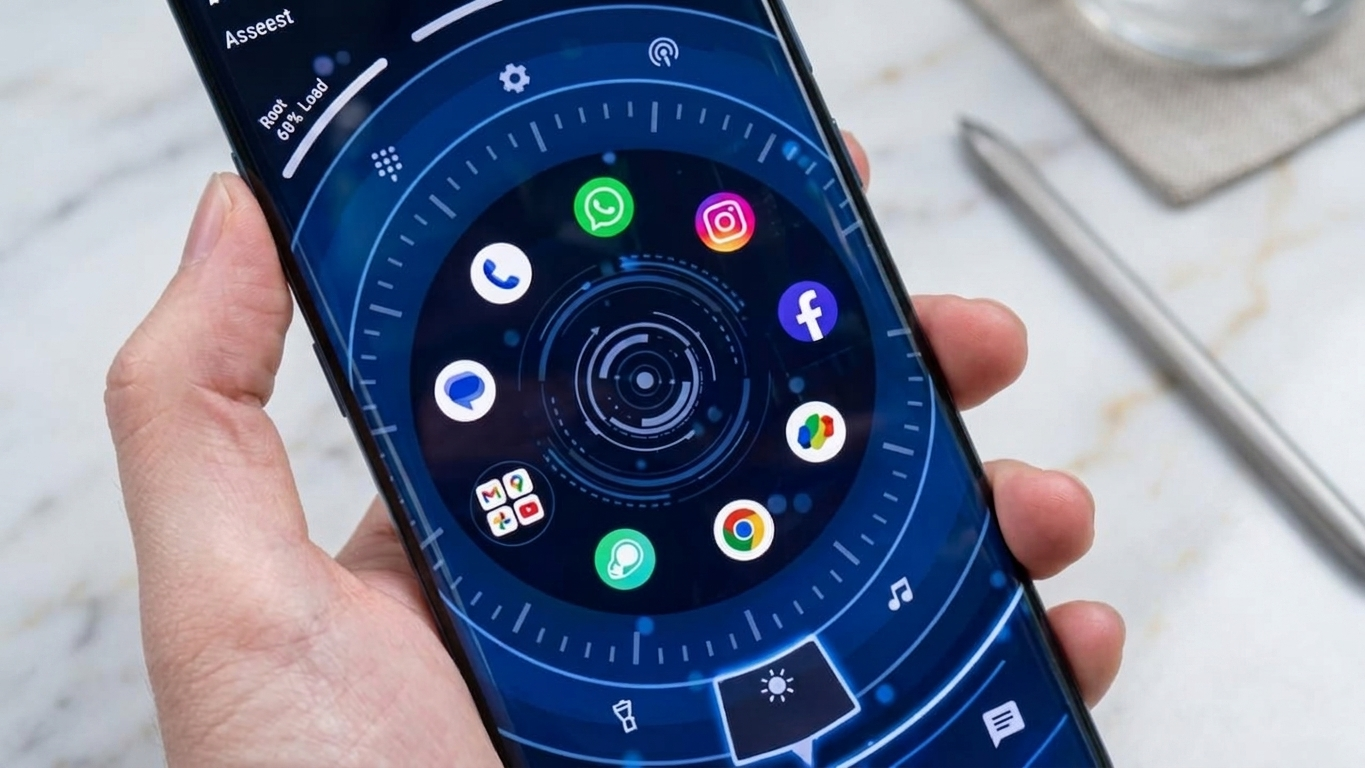
Customizing an Android phone is one of the easiest ways to make it feel more personal. While wallpapers and icon packs can refresh your device’s appearance, installing a launcher offers a complete home screen makeover. Orbit Launcher is designed for users who want a modern interface with plenty of customization options and a sleek, futuristic design.
With stylish themes, flexible layouts, and useful tools, the launcher helps create a home screen that looks organized while remaining easy to navigate.
Also Read: Niagara Launcher Brings a Cleaner and Faster Home Screen Experience to Android
What Is Orbit Launcher?
Orbit Launcher is an Android launcher that replaces the default home screen with a redesigned interface inspired by modern technology and digital aesthetics. Instead of changing the Android operating system, it focuses on improving the visual layout and making everyday navigation more convenient.
Its combination of attractive themes and practical features makes it appealing to users who enjoy personalizing their smartphones.
Why Choose Orbit Launcher?
Many Android launchers concentrate either on performance or customization. Orbit Launcher aims to provide a balance between both by offering modern visuals alongside useful home screen features.
Some of the reasons users choose Orbit Launcher include:
- Futuristic home screen designs
- Flexible customization options
- Organized app layouts
- Smooth navigation
- Widget support
- Stylish interface
Modern Themes and Visual Design
One of the launcher’s biggest highlights is its collection of technology-inspired themes that give Android devices a fresh appearance.
Depending on the version, users may find features such as:
- Modern dashboard-style layouts
- Animated transitions
- Stylish icon designs
- Clean home screen organization
- Contemporary interface elements
- Custom wallpapers and backgrounds
These visual improvements can help your smartphone feel more modern without replacing Android itself.
Personalize Your Home Screen
Orbit Launcher offers multiple customization settings that allow users to create a layout matching their personal preferences.
You can often adjust:
- Icon size
- Home screen grid
- Font styles
- Themes
- Animation effects
- Wallpapers
- Shortcut placement
The available options may vary depending on the launcher version.
Built-In Widget Support
Widgets help display useful information without opening individual apps.
Orbit Launcher supports various home screen widgets, including:
- Weather updates
- Calendar events
- Clock and date
- Battery information
- Quick shortcuts
Having important information available directly on the home screen can improve everyday convenience.
Smooth Navigation and Performance
Along with visual improvements, Orbit Launcher is designed to provide a responsive user experience.
Many users appreciate features such as:
- Fast app launching
- Smooth scrolling
- Responsive gesture controls
- Fluid screen transitions
- Organized navigation
Actual performance depends on your smartphone model, available memory, and Android version.
Benefits of Using Orbit Launcher
Orbit Launcher combines appearance and usability, making it suitable for users who want both style and functionality.
Some of its advantages include:
- Attractive futuristic themes
- Flexible home screen customization
- Modern interface design
- Easy app organization
- Widget compatibility
- Personalized layouts
- Smooth daily navigation
Who Might Enjoy Orbit Launcher?
This launcher may appeal to a variety of Android users, including:
- Android customization enthusiasts
- Students
- Professionals
- Gamers
- Content creators
- Technology fans
- Users who enjoy personalized smartphone interfaces
Anyone interested in giving their device a fresh look may find it worth exploring.
Things to Consider Before Installing
Before switching to Orbit Launcher, keep these points in mind:
- Some visual effects may require additional system resources.
- Older smartphones may not perform as smoothly with advanced animations.
- Available features can differ between app versions.
- Compatibility depends on your Android device and operating system.
Reviewing recent user feedback before installing is always a good idea.
How to Install Orbit Launcher
Getting started is simple:
- Open the Google Play Store.
- Search for Orbit Launcher.
- Install the app from a trusted publisher.
- Launch the application.
- Set it as your default launcher if you prefer the new interface.
After installation, you can customize the layout, themes, and widgets according to your preferences.

Also Read: Comfer Launcher Delivers a Fast, Clean, and Privacy-Focused Android Experience
Final Thoughts
Orbit Launcher offers a stylish way to refresh your Android home screen with modern themes, customizable layouts, and practical features. Its futuristic design, widget support, and flexible personalization options make it a great choice for users who enjoy experimenting with their device’s appearance.
If you’re looking for a launcher that combines attractive visuals with everyday usability, Orbit Launcher is certainly worth trying.

Ankita Kumar, founder of sabhigyan.com, is passionate about technology, smartphones, apps, and digital tools. With 8+ years of experience in the digital and tech space, he focuses on creating easy-to-understand, practical, and helpful content that makes everyday technology simpler for readers.
Advertisements