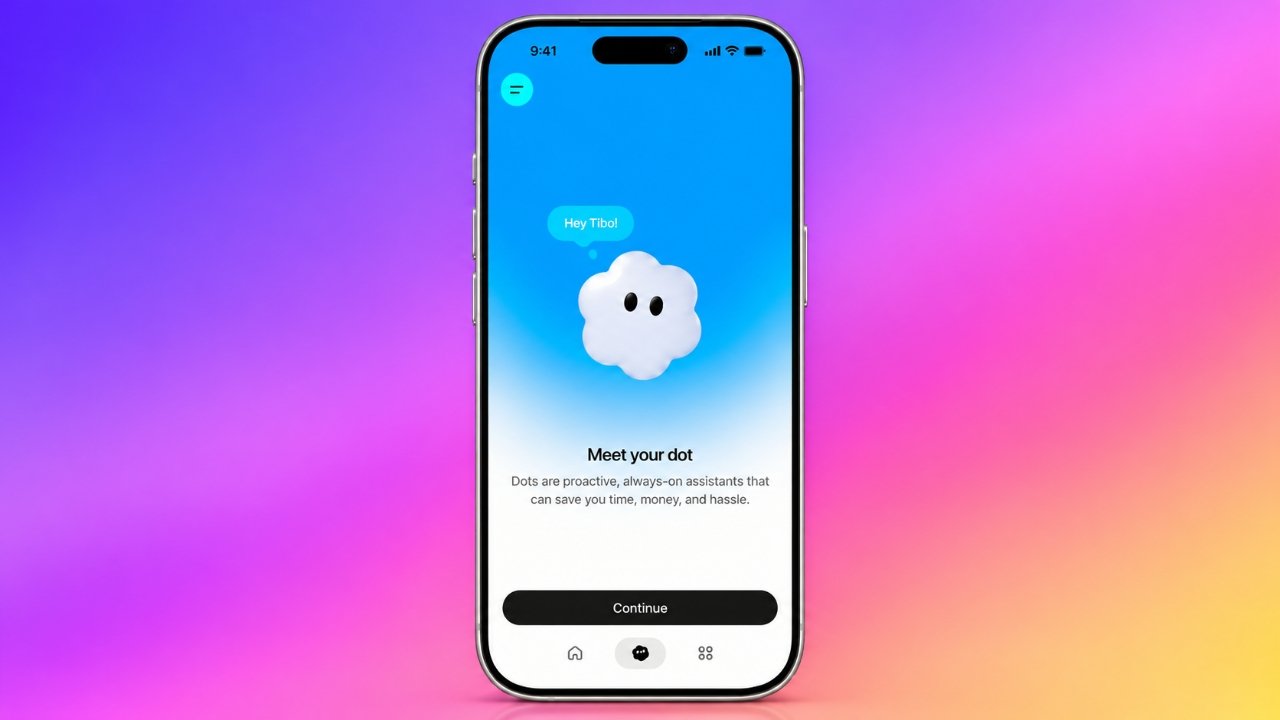
OpenAI is introducing a refreshed design for its ChatGPT mobile app, making it easier for users to access their favourite tools and AI features. One of the biggest changes is the addition of a dedicated Dots tab, which gives users quicker access to their personal AI agents.
The redesigned interface replaces the previous navigation layout with a bottom tab bar featuring three main sections: Home, Dots, and Explore. Users can also customise the navigation bar by pinning frequently used tools, including Codex, Images, and Projects.
The update began rolling out on November 19, 2026, with ChatGPT Pro users getting access first in supported regions. A limited number of Plus subscribers are also included in the initial release.
Here is a closer look at the new ChatGPT app design, its features, and who can access the update.
Also Read: ChatGPT Images 2.0 Brings Smarter and Better AI Image Creation
A Simpler Way to Navigate the ChatGPT App
Previously, many ChatGPT features were available through a side menu, which required users to leave the main chat screen to find specific tools. The redesigned interface aims to make navigation more straightforward by placing the most important sections at the bottom of the screen.
The new navigation bar contains three primary destinations:
| Section | Main purpose |
|---|---|
| Home | Opens the regular ChatGPT chat interface, where users can ask questions and start conversations. |
| Dots | Provides direct access to personal AI agents and their conversations. |
| Explore | Displays additional ChatGPT tools and features in an organised grid. |
This arrangement makes frequently used features easier to reach without repeatedly opening the navigation menu.
What Makes the New Dots Tab Important?
The dedicated Dots section is one of the most noticeable additions to the redesigned app.
Dots are OpenAI’s personal AI agents designed to help users manage ongoing tasks and work with connected applications. Depending on their configuration and available permissions, they can perform background activities and provide proactive suggestions.
Previously, users had to navigate through the side menu to access their dots. With the updated interface, they can simply select the Dots tab to open their agent and continue an existing conversation or begin a new one.
OpenAI has also been expanding dot functionality with features such as custom instructions and messaging support. Giving these agents a permanent position in the mobile navigation makes them more accessible for people who use them regularly.
Explore Tab Brings More Tools Together
Another important part of the update is the redesigned Explore section.
Instead of searching through different menus, users can browse a collection of ChatGPT features from one organised screen. The available tools include:
- Codex: An AI-powered coding tool.
- Images: Access to ChatGPT’s image-generation features.
- Projects: A workspace for organising related chats and files.
- Plugins: Access to supported third-party integrations.
- Space: An additional workspace feature.
- Finance: Financial information and related tools.
- Sites: Access to website-related features.
- Health: Tools for working with health and wellness information.
- Scheduled: Access to scheduled tasks and activities.
The availability of individual features may depend on the user’s account, subscription, region, and access permissions.
How to Add Your Favourite Tools to the Bottom Navigation Bar
The redesigned ChatGPT app also offers a customisation option that lets users place frequently accessed tools directly in the bottom navigation area.
If you regularly use Codex, Images, or Projects, you can pin them for quicker access.
Follow these steps:
- Open the ChatGPT app on your smartphone.
- Navigate to the Explore tab.
- Find the tool you want to add to the navigation bar.
- Touch and hold its icon.
- Choose Pin to tab bar from the available options.
Once pinned, the selected shortcut will appear in the navigation area.
If there is no available space, you may need to replace an existing shortcut. You can also remove a pinned tool by opening its menu and selecting Unpin from tab bar.
This gives users more control over which ChatGPT features are easiest to access.
Can You Return to the Previous ChatGPT Interface?
Users who prefer the older layout may have an option to switch back, depending on their eligibility and app version.
Some Pro subscribers receive the redesigned interface automatically. However, if the option is available on their account, they can manage the experience through the app’s settings.
Look for an option called New ChatGPT design in Settings. If it appears, users can switch the redesigned interface on or off.
Keep in mind that this setting may not be available to every account during the initial rollout.
ChatGPT Redesign Availability: Which Users Can Access It?
OpenAI is introducing the new mobile interface gradually rather than making it available to everyone at once.
According to the release information dated November 19, 2026, the initial rollout includes:
- ChatGPT Pro subscribers aged 18 and above.
- Users located in regions where Dots are supported.
- A limited group of eligible ChatGPT Plus subscribers.
However, the initial release excludes several regions, including:
- European Economic Area (EEA)
- United Kingdom
- Switzerland
- South Korea
Users in these locations will not receive the redesigned experience as part of the initial rollout.
India is not included in the list of excluded regions. Therefore, eligible Indian Pro subscribers may receive the update if Dots are available in their region.
Most free and Plus subscribers may need to wait until OpenAI expands access. The company has not provided a confirmed date for a wider release.
What Should You Do If the New Design Is Missing?
If your account appears to meet the eligibility requirements but the updated interface is not showing, try the following:
- Visit the Google Play Store or Apple App Store.
- Check whether a newer version of ChatGPT is available.
- Update the application if necessary.
- Open ChatGPT and visit Settings.
- Look for the new design option.
Updating the app may help, although access also depends on OpenAI’s rollout schedule and account eligibility.
Frequently Asked Questions
1. What is the new Dots tab in ChatGPT?
The Dots tab is a dedicated section in the redesigned ChatGPT mobile app. It provides direct access to personal AI agents, allowing users to start or continue conversations without navigating through the side menu.
2. When did OpenAI introduce the redesigned ChatGPT app?
The rollout started on November 19, 2026, with eligible Pro subscribers receiving access first in supported regions.
3. Can free ChatGPT users access the new interface?
The initial rollout mainly targets Pro subscribers, along with a small group of eligible Plus users. Most free users may have to wait for a broader release.
4. How can I pin Codex or Images to the bottom bar?
Open Explore, touch and hold the Codex or Images icon, and select Pin to tab bar. The tool will then appear among your navigation shortcuts if space is available.
5. Is it possible to remove a pinned tool?
Yes. Open the tool’s menu in Explore and select Unpin from tab bar to remove its shortcut.
6. Can I disable the redesigned ChatGPT interface?
Some eligible users can switch between the old and new layouts. If the New ChatGPT design setting appears in your account, you can use it to change the interface.
7. Is the new ChatGPT design available in India?
India is not among the regions excluded from the initial rollout. Eligible Pro users aged 18 or older may receive the update if Dots are supported for their accounts.
Also Read: ChatGPT Launches New $100/Month Plan to Bridge Gap for Power Users
Final Thoughts
OpenAI’s latest ChatGPT mobile redesign focuses on making the app easier to navigate and its growing collection of tools more accessible. The addition of a dedicated Dots tab is particularly useful for people who regularly work with personal AI agents.
The new Explore section also provides a more organised way to discover features, while the ability to pin shortcuts allows users to customise their navigation experience.
For now, availability remains limited, with Pro subscribers receiving priority access and only a small number of Plus users included. As OpenAI gradually expands the rollout, more users may eventually get the redesigned interface.
If you use ChatGPT frequently on your smartphone, checking for app updates and reviewing your Settings is a good way to see whether the new design has reached your account.

Ankita Kumar, founder of sabhigyan.com, is passionate about technology, smartphones, apps, and digital tools. With 8+ years of experience in the digital and tech space, he focuses on creating easy-to-understand, practical, and helpful content that makes everyday technology simpler for readers.
Advertisements