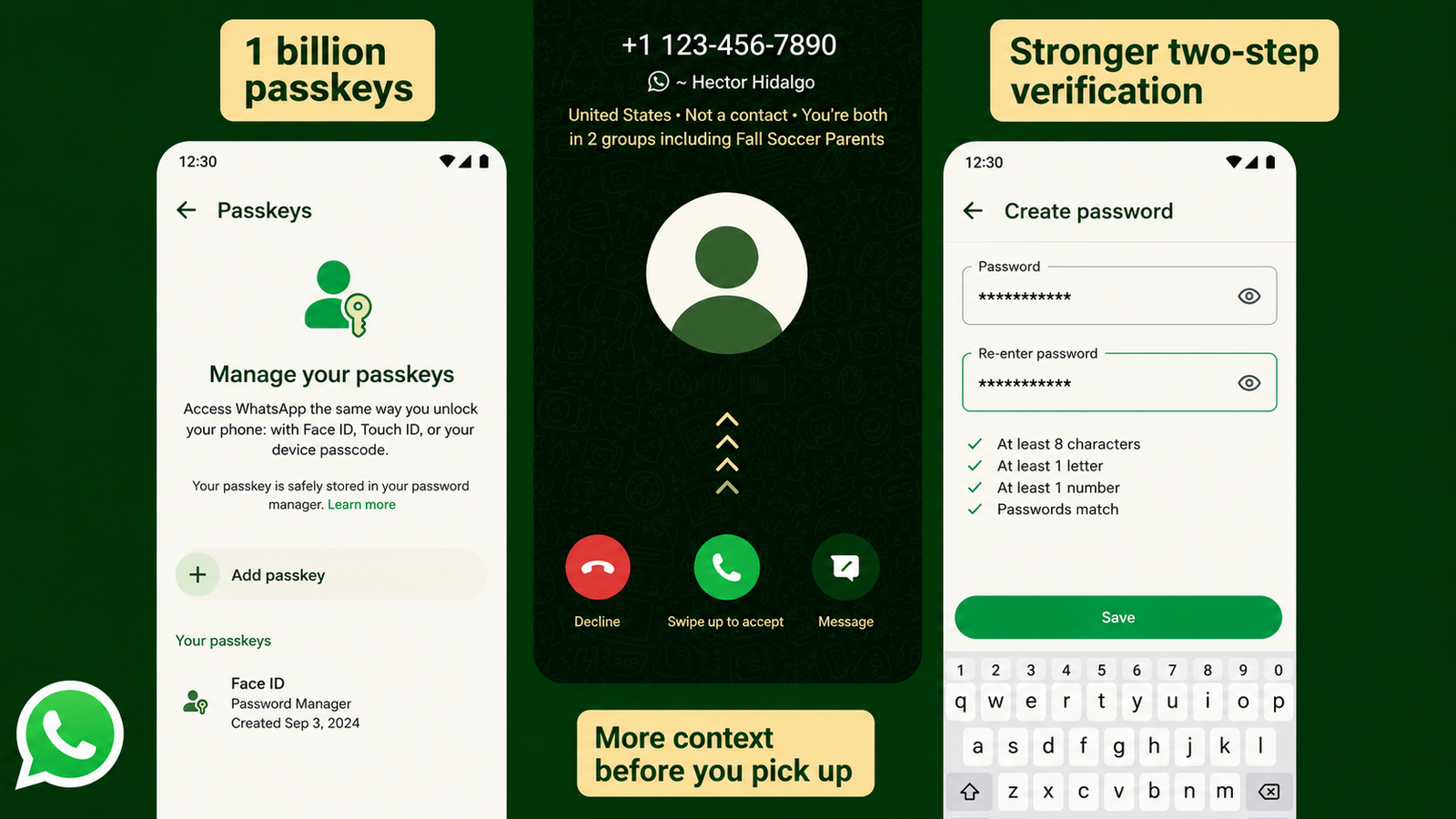
WhatsApp is introducing several security improvements aimed at helping users keep their accounts protected from unauthorized access. The latest changes focus on stronger account credentials, better two-step verification, more information about unknown callers, and broader passkey support.
These tools are designed to make it harder for someone else to access an account, while also making everyday sign-ins more convenient.
Also Read: WhatsApp May Soon Let Meta AI Expand Photos for Status Updates
Create a Stronger Password for Better Security
WhatsApp is improving its two-step verification system by giving users the option to use a stronger password instead of depending only on a short six-digit PIN.
A password can contain a combination of letters, numbers, and special characters, making it harder to guess than a simple or commonly used PIN.
For example, using an easily predictable combination such as 123456 is not a good security practice. If WhatsApp offers the password option on your account, choosing a unique and difficult-to-guess password can provide an additional layer of protection.
Why Two-Step Verification Matters
Two-step verification is one of the most useful security settings available in WhatsApp.
Normally, signing in to an account requires a verification code. With two-step verification enabled, an additional credential is required as well. This means obtaining the one-time verification code alone may not be enough to gain access to the account.
You can enable or manage this feature from WhatsApp’s account security settings. It is also a good idea to keep your recovery information up to date so you don’t lose access to your account if you forget your security credentials.
WhatsApp Adds More Context to Unknown Calls
Calls from unfamiliar numbers can sometimes be difficult to judge. WhatsApp is working to provide users with additional information about certain unknown callers before they decide whether to answer.
Depending on the situation, WhatsApp may display details such as:
- Whether the caller is located in another country
- Whether you and the caller are members of any of the same WhatsApp groups
This information can give you some additional context before answering an unfamiliar call. If a call looks suspicious or you do not recognize the person, you can simply choose not to answer.
Passkeys Make Account Sign-In More Convenient
WhatsApp is also expanding its use of passkeys, which provide another way to verify your identity without relying on traditional passwords or SMS verification codes for every sign-in.
Passkeys can use security features already available on your device, such as:
- Fingerprint authentication
- Face recognition
- Your device screen lock
This can make the login process both faster and more convenient while using the security mechanism built into your phone.
How to Check Passkey Settings on WhatsApp
If passkeys are available for your account, you can look for the option by opening:
WhatsApp → Settings → Account → Passkeys
The exact options you see may vary depending on your device, WhatsApp version, and account availability.
Simple Steps to Keep Your WhatsApp Account Safer
Along with WhatsApp’s built-in security features, a few basic habits can help protect your account:
- Use a unique, strong password or PIN for two-step verification.
- Never share your WhatsApp verification code with another person.
- Be careful with unexpected calls and messages from unknown contacts.
- Use passkeys when available if they are convenient for you.
- Keep WhatsApp and your phone’s operating system updated to receive the latest security improvements.
Also Read: How to Schedule WhatsApp Messages in the Future: A Feature That May Soon Arrive
Final Thoughts
WhatsApp’s latest security-focused changes give users more options for protecting their accounts and verifying their identity. Stronger passwords, two-step verification, additional information about unknown callers, and passkeys can all contribute to a safer WhatsApp experience.
However, no security feature can replace basic caution. Keeping verification codes private and avoiding suspicious messages or calls remain important steps for protecting your account.

Sourav Gorai, founder of sabhigyan.com, is passionate about technology, smartphones, apps, and digital tools. With 8+ years of experience in the digital and tech space, he focuses on creating easy-to-understand, practical, and helpful content that makes everyday technology simpler for readers.
Advertisements