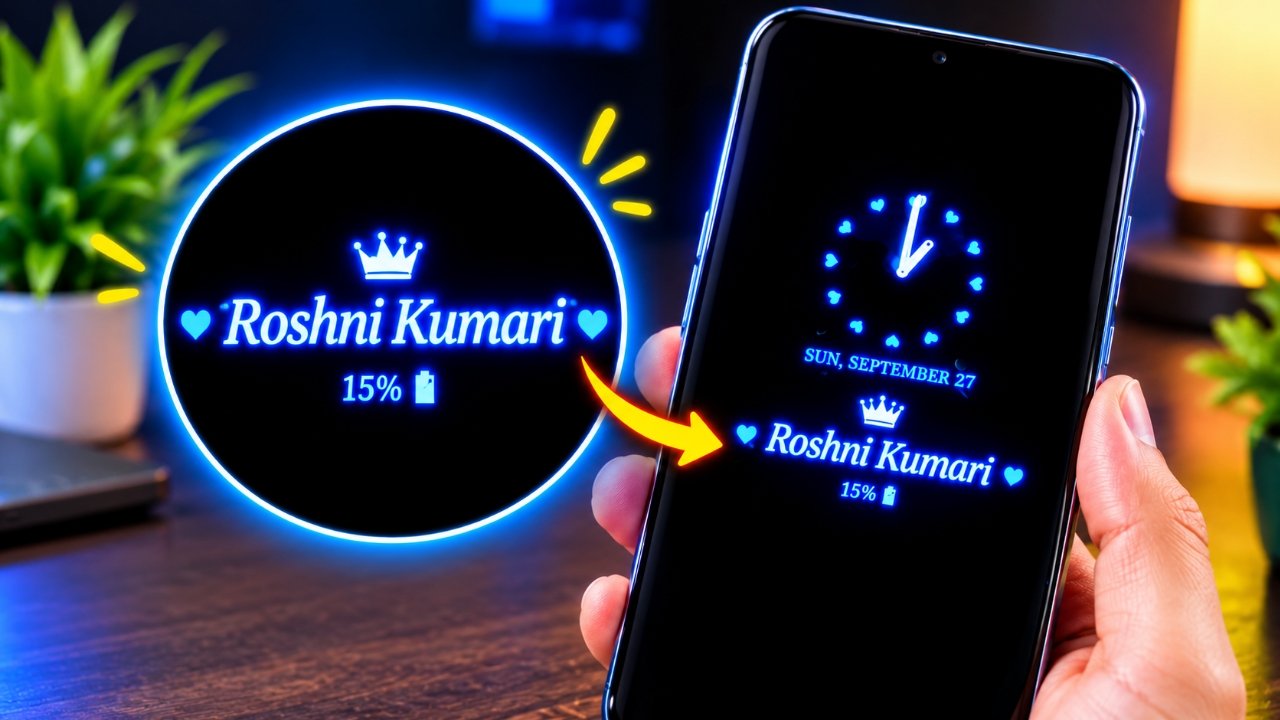
Checking the time usually means waking up your phone, but an Always On Display can make that unnecessary. It lets you view important information while the screen is mostly idle, making quick checks more convenient.
Always On Display Clock Widget is an Android customization app designed for users who want to change the appearance of their idle screen. Along with different clock designs, it can show details such as the date, day, battery percentage and notifications on compatible devices.
The app also includes several visual styles, including digital, analog, emoji, picture and calendar-based clocks.
Also Read: Notch Launcher: Use Your Phone’s Punch-Hole Camera as a Smart Shortcut Area
What Is Always On Display Clock Widget?
Always On Display Clock Widget is an Android app focused on customizing the information and appearance of an idle smartphone display.
On supported phones, it can keep selected information visible without requiring you to unlock the device every time you want to check the clock. This can be useful for quick glances at the time, date or other available information.
However, the exact features and behavior can vary depending on the smartphone model, display technology and Android settings.
Multiple Clock Styles for Different Looks
One of the main reasons to try the app is its variety of clock designs. Instead of relying on the default clock provided by your phone, you can choose a style that matches your preference.
The available designs include:
- Digital clock
- Analog clock
- Emoji clock
- Picture clock
- Calendar clock
This variety gives users more flexibility when personalizing their always-on screen.
Customize the Digital Clock
If you prefer a simple and readable design, the digital clock is a practical option. It provides a familiar way to check the time without adding too many visual elements.
Depending on the settings available on your device, you can also modify different visual aspects of the clock, such as colors and appearance. This allows you to create a design that feels more suitable for your smartphone.
Analog Clock for a Traditional Appearance
Not everyone likes a digital clock. If you prefer the look of a traditional wristwatch, the analog clock options can provide a more familiar appearance.
The app offers different analog designs, allowing users to switch between styles instead of being limited to the standard clock on their phone.
Add a More Fun Look With Emoji Clocks
For users who want something less conventional, the emoji clock option provides a more playful way to customize the display.
Emojis and stickers can become part of the clock design, giving the idle screen a different appearance compared with a regular digital or analog clock.
Picture and Calendar-Based Designs
The picture clock option adds another layer of personalization by combining clock information with an image or supported visual style.
There is also a calendar clock for users who want date-related information to be easier to access. Instead of turning on the full display simply to see the date, you may be able to view it directly from the idle screen, provided your phone supports the required functionality.
See Battery and Notification Information
The app can do more than display the current time. Depending on the device and configuration, additional information may include:
- Date
- Day
- Battery percentage
- Notifications
This can be handy when you only need to glance at your phone rather than unlock it completely.
Some gesture controls are also mentioned, with options such as tapping, double-tapping or sliding potentially being used to control the display. The available gestures can vary according to the smartphone and its settings.
Edge Light Adds Another Visual Effect
Another feature available in the app is Edge Light. It adds lighting effects around the edges of the phone’s display, giving the screen a more decorative appearance.
You can use the feature along with your selected clock style where supported. The final effect and available controls may differ depending on your smartphone.
Will Always On Display Drain the Battery?
Battery usage is an important consideration when using any always-on screen feature.
Because some display elements can remain active while the phone is idle, there may be additional battery consumption. AMOLED displays can be particularly suitable for this type of feature because individual pixels can be controlled independently, but the actual power usage still depends on the device.
Factors such as the display technology, brightness, refresh settings, hardware and how often the feature remains active can all influence battery consumption.
For that reason, there is no single battery figure that applies to every Android phone. If you plan to keep the feature enabled throughout the day, it is a good idea to monitor your phone’s battery behavior.
Is Always On Display Clock Widget Worth Trying?
Always On Display Clock Widget is primarily aimed at Android users who enjoy customizing their phone’s idle screen.
Its selection of digital, analog, emoji, picture and calendar designs gives users several options instead of sticking with a standard clock. Features such as battery information, notifications and Edge Light can also make the display more useful or visually interesting.
That said, the experience will depend heavily on your smartphone. Some features may not work in the same way on every device, so checking compatibility before relying on the app is important.
Frequently Asked Questions
What is Always On Display Clock Widget used for?
It is an Android customization app that can display clock information and other details, including the date, battery percentage and notifications, on compatible smartphones.
Does the app include digital and analog clocks?
Yes. It provides both digital and analog clock designs, along with other options such as emoji, picture and calendar-style clocks.
Can I customize the digital clock?
Yes. The app provides different customization options for the digital clock, including visual settings such as colors, depending on the available features on your device.
Does Always On Display Clock Widget work on every Android phone?
Not necessarily. Compatibility and available features can vary depending on the smartphone, Android version, display technology and system settings.
Can an always-on display use more battery?
It can. Keeping parts of the display active may increase battery consumption, although the actual impact differs from one smartphone to another.
Official Play Store App Link
Also Read: Nocebo Launcher: A Fresh and Customizable Way to Use Your Android Home Screen
Final Thoughts
Always On Display Clock Widget is a customization-focused app for Android users who want something different from the standard idle-screen clock. With digital, analog, emoji, picture and calendar designs, it provides several ways to change the look of an Always On Display.
Additional information such as the date, battery level and notifications can also make the feature more convenient for quick checks. The Edge Light option adds another visual customization choice.
Before keeping the feature enabled all the time, make sure your smartphone supports the required functionality and monitor battery consumption. On a compatible device, the app can be a simple option for giving your idle screen a more personalized look.

Sourav Gorai, founder of sabhigyan.com, is passionate about technology, smartphones, apps, and digital tools. With 8+ years of experience in the digital and tech space, he focuses on creating easy-to-understand, practical, and helpful content that makes everyday technology simpler for readers.