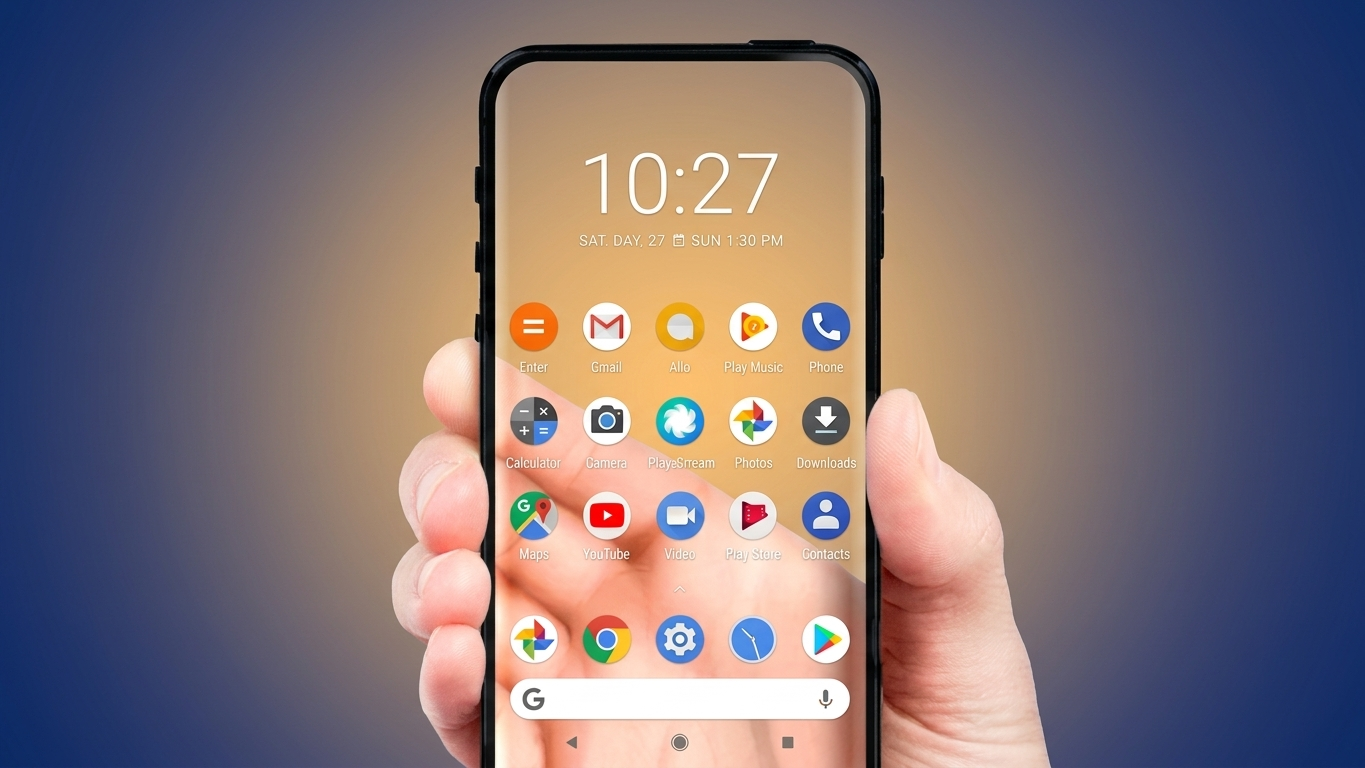
If you’re tired of using the same static wallpapers every day, a transparent live wallpaper can give your Android phone a completely different appearance. Instead of displaying a traditional image, this type of wallpaper uses your device’s camera to show the environment around you as your home screen background. The result is a creative visual effect that makes your phone appear transparent while you navigate through apps and widgets.
Whether you enjoy customizing your device or simply want to try something unique, a transparent wallpaper app offers a fun way to personalize your smartphone.
Also Read: DNA Launcher Review (2026): Turn Your Android Home Screen Into a Unique DNA-Inspired Design
What Is a Transparent Live Wallpaper?
A transparent live wallpaper is an Android application that uses your phone’s camera feed as the wallpaper for your home screen. Rather than showing a photo or animated background, the app displays a live view captured by your device’s camera behind your icons and widgets.
As you move your phone, the wallpaper updates in real time, creating the illusion that you can see straight through the display.
Note: The transparent effect is a visual feature created using the camera feed. The phone’s screen itself does not become physically transparent.
How Does the App Work?
Once the app is installed and camera permission is granted, it activates your phone’s camera and displays the live video as the wallpaper. You can continue opening apps, browsing the web, reading messages, or using your device normally while the camera view remains visible in the background.
Many transparent wallpaper apps are designed to balance visual quality with performance, helping reduce unnecessary battery consumption while providing a smooth experience.
Main Features
Live Camera Wallpaper
Displays the real-time view from your phone’s camera as your home screen background.
Lightweight Design
Most apps are compact in size, making them suitable for many Android devices without taking up much storage.
Performance Settings
Many versions let you adjust options such as video quality, frame rate, or other display preferences to match your device.
Continuous Background Effect
The wallpaper stays active while you move around your home screen and launch supported applications.
Modern Visual Appearance
The live camera background creates a distinctive look that stands out from traditional wallpapers.
Why Try a Transparent Live Wallpaper?
There are several reasons why users enjoy this style of wallpaper:
- Creates a fresh and eye-catching home screen.
- Offers a live background instead of a fixed image.
- Easy to install and configure.
- Adds a unique visual effect that often attracts attention.
- Lets you personalize your Android device in a creative way.
How to Set Up a Transparent Live Wallpaper
Getting started is usually simple:
- Install a transparent live wallpaper app from the Google Play Store.
- Open the application.
- Allow the required camera permission.
- Choose the option to apply the transparent wallpaper.
- Confirm the wallpaper settings when prompted.
After setup, your phone’s camera view will appear behind your home screen icons.
Helpful Tips for Better Performance
- Lower the video quality if you want to reduce battery usage.
- Keep your camera lens clean for a clearer background.
- If the wallpaper appears less smooth, reducing the frame rate may improve overall performance.
- Since the wallpaper relies on your camera, battery life may vary depending on your device and usage.
Things to Keep in Mind
Before using a transparent wallpaper app, consider these points:
- The feature requires camera access to function.
- Continuous camera usage may increase battery consumption compared to static wallpapers.
- Performance can differ based on your phone’s hardware and Android version.
- Some apps may offer additional customization features depending on the developer.

Also Read: EDGE Lighting – Add Colorful LED Borders and Live Wallpaper Effects on Android
Is It Worth Trying?
If you enjoy customizing your smartphone with creative visual effects, a transparent live wallpaper is an interesting option. It transforms the look of your home screen by replacing ordinary wallpapers with a live camera background, giving your device a distinctive appearance without changing how you use it.
While it doesn’t make your phone physically transparent, it creates a convincing illusion that many users find fun and visually appealing.
Disclaimer
This feature creates a transparent-looking effect by displaying your device’s live camera feed as the wallpaper. Actual functionality, battery usage, and available settings may vary depending on your smartphone model, Android version, and the specific application you choose.

Ankita Kumar, founder of sabhigyan.com, is passionate about technology, smartphones, apps, and digital tools. With 8+ years of experience in the digital and tech space, he focuses on creating easy-to-understand, practical, and helpful content that makes everyday technology simpler for readers.
Advertisements