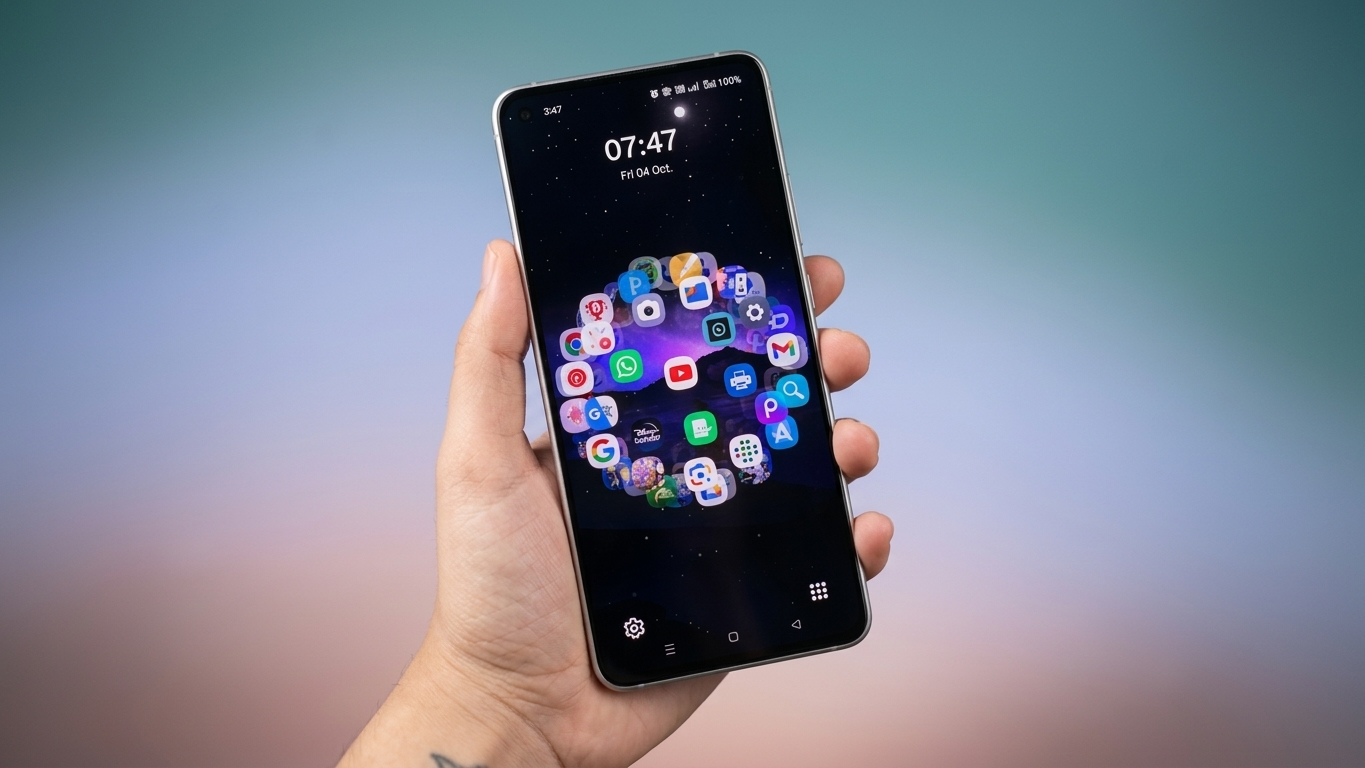
If you enjoy giving your Android phone a fresh and creative look, a launcher can completely transform the way your home screen feels. While many launchers focus on minimal layouts or colorful themes, DNA Launcher offers something different. It lets you organize your app icons in a layout inspired by the double-helix structure of DNA, creating a home screen that stands out from traditional grids.
In this guide, you’ll learn what DNA Launcher offers, its main features, how to enable the DNA-style layout, and whether it’s worth trying.
Also Read: LED Keyboard – Colorful RGB Lighting Keyboard for a Stylish and Personalized Typing Experience
What Is DNA Launcher?
DNA Launcher is an Android home screen replacement app that focuses on customization and unique visual layouts. Instead of displaying apps in the usual rows and columns, it includes a special mode that arranges icons in a rotating DNA-inspired pattern.
As you interact with the screen, the layout creates a dynamic visual effect that gives your phone a completely different appearance while still allowing easy access to your installed apps.
Key Features of DNA Launcher
Creative DNA-Style Home Screen
The highlight of DNA Launcher is its holographic DNA layout. Once enabled, your app icons appear in a spiral arrangement inspired by the structure of DNA, making your home screen look modern and eye-catching.
Extensive Personalization Options
The launcher provides several ways to customize your device, including:
- Adjust icon size
- Rename app labels
- Change icon appearance
- Apply different icon packs
- Modify the overall home screen layout
These options allow you to create a setup that matches your personal style.
Multiple Themes and Display Modes
DNA Launcher includes different visual styles, allowing users to switch between layouts without changing devices. Whether you prefer a clean interface or a futuristic design, you can experiment with different themes until you find one you like.
Lightweight Performance
Despite offering advanced customization, the launcher is designed to run efficiently on many Android devices. It aims to provide smooth navigation without adding unnecessary load to your phone.
Gesture Shortcuts
To improve usability, DNA Launcher supports gesture controls. Depending on your device and launcher version, you can assign actions such as:
- Swipe gestures
- Double tap shortcuts
- Quick app launching
- Custom navigation actions
These shortcuts can help reduce the number of taps needed for everyday tasks.
Privacy-Oriented Features
Some versions of DNA Launcher include additional privacy tools, such as options to hide selected apps or lock them for extra protection. Available features may vary depending on the app version and your Android device.
Everyday Experience
Using DNA Launcher feels quite different from a standard Android launcher. The animated layout adds a unique visual effect while browsing apps, making your home screen feel more interactive.
If you enjoy experimenting with new launcher designs or frequently customize your phone, DNA Launcher offers a refreshing alternative to traditional Android interfaces.
How to Enable the DNA Layout
After installing DNA Launcher from the Google Play Store, follow these general steps:
- Open the DNA Launcher app.
- Complete the initial setup.
- Open DNA Settings.
- Select Launcher Style.
- Choose Holographic Mode.
- Return to the home screen to view the DNA-inspired app arrangement.
Menu names may vary slightly depending on the version of the app.
Is DNA Launcher Worth Trying?
If your goal is to make your Android home screen look different from the default interface, DNA Launcher is an interesting option. Its DNA-inspired layout, flexible customization tools, gesture support, and theme options provide plenty of ways to personalize your device.
While the visual design may not suit everyone, users who enjoy creative home screen setups will likely appreciate its distinctive appearance.

Also Read: Lighter Simulator App for Android Delivers Realistic Concert-Style Flame Effects
Final Thoughts
DNA Launcher offers a fun and unusual approach to Android customization by replacing the standard app grid with a DNA-inspired interface. Along with icon customization, themes, gesture controls, and personalization features, it provides an engaging experience for users who like experimenting with their phone’s appearance.
If you’re looking for a launcher that delivers something beyond the typical Android home screen, DNA Launcher is worth exploring.

Ankita Kumar, founder of sabhigyan.com, is passionate about technology, smartphones, apps, and digital tools. With 8+ years of experience in the digital and tech space, he focuses on creating easy-to-understand, practical, and helpful content that makes everyday technology simpler for readers.
Advertisements